Tuesday, October 11, 2011
Rigging Update - Main Character pt 6 Arms
Belive it or not, I spent one whole day, yes,
One whole day yesterday setting up the rig for the left arm excluding the fingers and I went to sleep straight away after I was done.
Last time I did my own custom rig, I spent half a day only. With that you can see the vast technical difference between advanced rigging and my initial knowledge of simple rigging which wasn't really that simple either.
I do not wish to explain in detail how much pain I've gone through to finally complete the setup.
All I can say is that the rig consists of fk/ ik rig setups for the upper and lower arm, plus a lot of other bonus controls like setting the visibility of ik and fk controls and animation fk/ ik choice settings using the expression editor and several MEL scripts.
Easier said than done.
However I pulled through and that's what counts, so let's proceed on to the fingers.
Sunday, October 9, 2011
Rigging Update - Main Character pt 5 Arms
Just a quick update, a simple test rig for an arm.
By default, the ik handle tool doesn't allow the joints to stretch beyond their scale limit when it's being translated. The first solution we might resort to is to use setDrivenKeys to do the job manually. However, class has taught me otherwise.
This Mel script setup defies the limitations of the ik handle for the arm. It is much more effective and accurate than doing it manually due to human error.
In the script, I set up initial default values which are used to reset everything. After doing so, I defined the value of the full arm length by adding both upper and lower arm length values. Then I used a setDrivenKeyframe command which defines the:
Driver,
Driver's value,
Driven Attribute &
Driven Attribute's Value.
These will then be used in such a way where, when the Driver is at its maximum length (full arm length) without stretching, it will set the translate X value of the upper and lower arm length. That's why I need those default attributes in the previous command.
Using more similar setDrivenKeyframe command setups, the script is capable of multiplying the size of the arm length when the ik handle is being translated beyond the full length of the arm. Thus allowing infinite stretching of the arms instead of limiting them to a scale of 1.
Rigging Update - Main Character pt 4 Head Complete
Looks simple right?
Well unfortunately, it's not.
In order to achieve realistic human motion, a mixture of fk and ik rig controls had to be applied along with multiple constraints between the head, neck, shoulders and hips. Custom attributes have also been added which control the point and orient space of the head joint.
I'm one third through the advanced rigging class now and so far it has been getting more and more intense. Because I've made it this far, I've gained even more confidence in pulling through this whole project successfully.
Rigging Update - Main Character pt 3 Torso Complete
The torso rig is complete.
Now I'll proceed to rigging the head.
Here's a test file of how I'm required to proceed with rigging the neck.
When using the ik spline tool on the neck joints, I need to make sure they don't jerk or screw up when I pull any of the child joints towards the base joint.
Saturday, October 8, 2011
Rigging Update - Main Character pt 2
Usually for character rigging we have to use smooth binding between the joints and the geometry. However for now I'll stick with rigid binding by parenting split geometry parts to joints. The reason for doing is that it's much easier and less tedious to use rigid binding. This would speed things up for me while I'm learning advanced rigging instead of having to paint weights which is a painful process.
Split geometry clean up.
In the previous post, I've completed building the skeletal joint structure for the character. What I forgot to mention was that the structure's purpose was for FK (Forward Kinematics) controls. What I'm doing now is a secondary rig called IK (Inverse Kinematics) controls. With these controls, I'll have the ability to switch between FK and IK when animating my character. This would give me an advantage especially when I need to animate intense action sequences.
Friday, October 7, 2011
Rigging Update - Main Character pt 1
I've built up skeleton joints and fixed joint orientations for the main character.
I have basic rigging knowledge. Thus I'm actually capable of applying basic rig techniques such as ik and fk handles, joint controls and setting up a basic character joint structure all ready for animation. However due to the complexity of the animations I aim to achieve, I'm currently following a classified advanced rigging class which I shouldn't be at liberty to share due to legal matters.
Despite that, I would still keep this blog updated with summarized steps and progress, during this hardcore rigging process which I aim to complete by Wednesday.
Wednesday, October 5, 2011
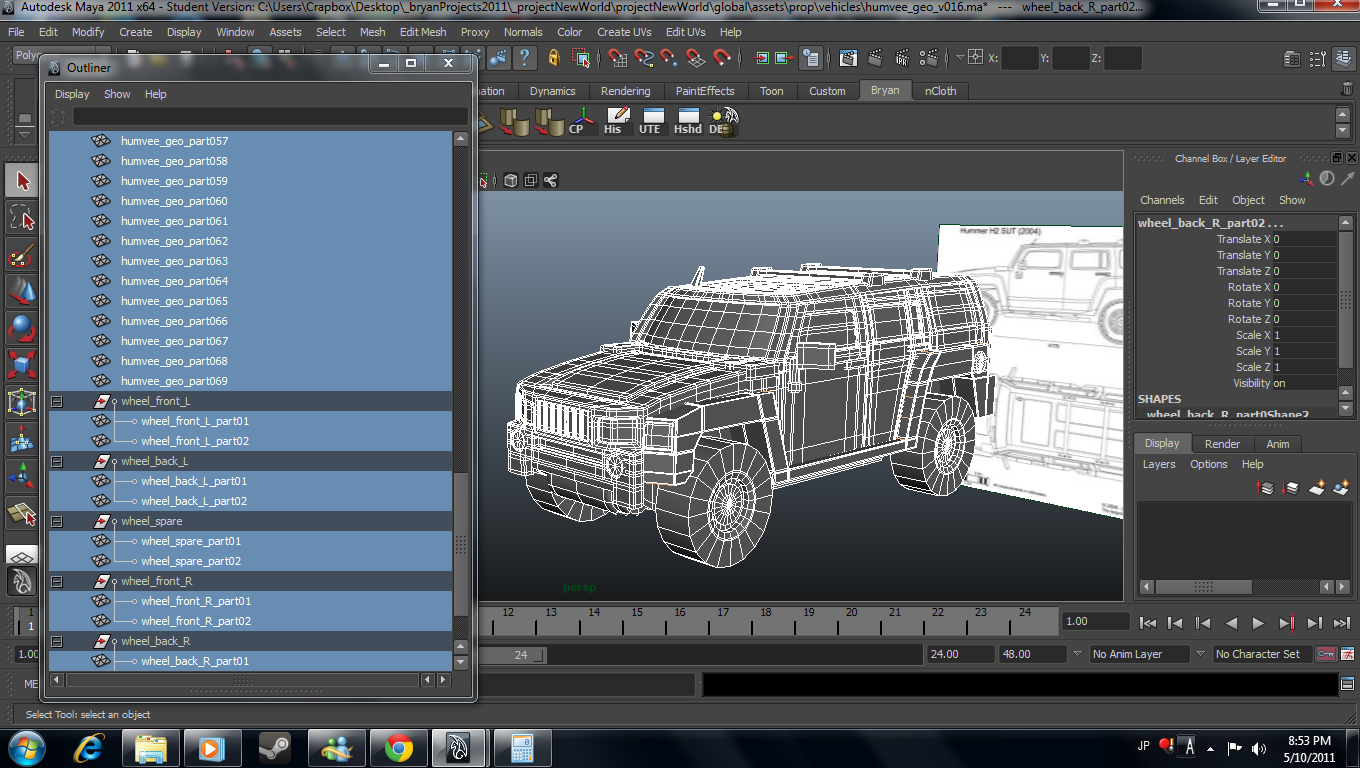
Model Update - Humvee
Although my plan for this week was to finish rigging the main character, some plans have been changed.
I've just launched another project, Project Dead Punk which can be accessed through the navigation at the side of this blog.
I'm almost finished modeling an armoured vehicle which would serve as a mode of transport for the main character. I will also use the same armoured vehicle geometry for Project Dead Punk.
Subscribe to:
Posts (Atom)